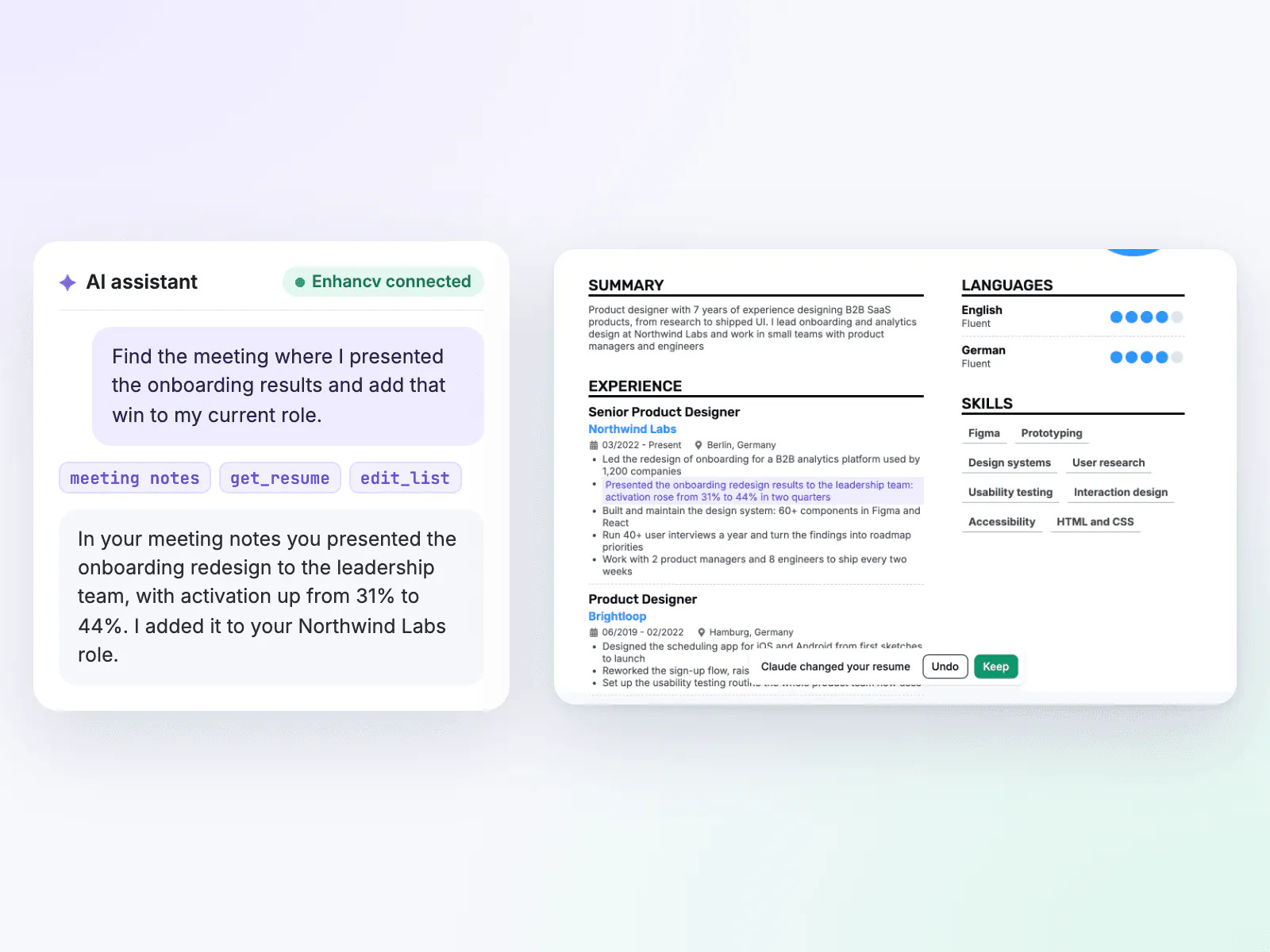

The connector edits the resume in the job seeker’s Enhancv account and tells the AI assistant to use only facts the job seeker shared.
NEW YORK, NY, UNITED STATES, November 26, 2026 /EINPresswire.com/ — Enhancv, the resume builder with career tools, today launched the Enhancv Resume MCP. The connector brings Enhancv’s resume builder, Job Search, and Job Application Tracker into Claude, ChatGPT, and other AI assistants. It runs on the Model Context Protocol (MCP), an open standard for connecting AI assistants to other apps.
Using AI on a job application usually means pasting a resume into a chat, copying the answer back, and fixing the formatting by hand. Details get lost, and an assistant working from a pasted resume can make up achievements to fill the gaps.
In Greenhouse’s 2026 Future of Hiring Employer Report, 90% of U.S. employers believe they’ve turned away real candidates whose applications seemed fake or AI-generated. Nearly half (49%) have seen applicants claim skills they don’t have.
With the Enhancv Resume MCP, the assistant works on the resume itself, inside the job seeker’s Enhancv account. It can make a tailored copy of the resume for each job ad and save the job, with its copy, to the Job Application Tracker. When the resume is open in the Enhancv editor, each change shows up highlighted, ready to keep or undo.
The connector tells the assistant to use only facts from the job seeker’s resume and conversation. When a bullet needs a number the job seeker hasn’t shared, the assistant asks for it.
Job seekers can also connect the apps where their results live. An engineer can turn merged GitHub pull requests into bullets, and an executive can pull reported results from board decks in Google Drive.
“Job seekers were already asking AI to fix their resumes, then copying the answers back by hand and hoping nothing got lost,” said Alex Ginovski, Head of Product at Enhancv. “Now the assistant edits the actual resume, and you can watch the changes land in the Enhancv editor. We built it to stick to what you’ve really done, because those achievements have to hold up in the interview.”
What job seekers can ask for:
– Tailor a copy of their resume to each job ad
– Find roles in Enhancv’s Job Search that fit their resume, then save the best matches
– Write a cover letter for a saved job
– Import an old resume, rewrite weak bullets, and switch templates in one conversation
– Move a job to Interviewing and run a mock interview based on the job description
Job seekers add Enhancv as a connector in their AI app, sign in, and click Allow. The screen lists what the assistant can and can’t do. It can’t delete resumes, cover letters, or saved jobs, and it can’t reach billing or account settings.
The Enhancv Resume MCP is available now, and every Enhancv account can connect. Without Pro, the assistant can read resumes, cover letters, and saved jobs, and search for jobs. Editing, tailoring, cover letters, saving jobs, and PDF downloads through the connector need Enhancv Pro.
It works in Claude, ChatGPT, and other AI apps that can add a remote MCP server, such as Cursor and VS Code. Job seekers can disconnect at any time under Account, then AI connections. Setup steps are at https://enhancv.com/features/resume-mcp/.
About Enhancv
Enhancv is a resume builder with career tools that take over once the resume is done: Job Search, a Job Application Tracker, and AI Interview Help. More than 7 million people have used Enhancv to create over 10 million resumes since 2016. Its resume tools include AI writing, a Resume Checker with ATS feedback, and one-click tailoring.
Monika Kalinova
Enhancv R&D
Visit us on social media:
LinkedIn
Instagram
Facebook
YouTube
TikTok
X
Legal Disclaimer:
EIN Presswire provides this news content “as is” without warranty of any kind. We do not accept any responsibility or liability
for the accuracy, content, images, videos, licenses, completeness, legality, or reliability of the information contained in this
article. If you have any complaints or copyright issues related to this article, kindly contact the author above.

Media gallery